How to Organize Your Digital Workspace: Productivity Tips for Beginners
The Importance of Digital Organization
In a world where technology shapes nearly every part of our daily routine, the quality of your workflow often depends on how well your digital workspace is organized. A cluttered digital environment can make it harder to find important files, increase stress, and reduce motivation. Studies suggest that disorganization can take up as much as 25% of a worker’s time, directly affecting deadlines and overall productivity.
For students managing several assignments at once or freelancers handling multiple clients, digital organization is more than a helpful habit. It is an essential part of working efficiently and staying in control.
Key Components of Digital Organization
When you begin organizing your digital workspace, a few core practices can make a significant difference:
File Management: A clear file and folder structure can transform the way you work. Organize files by project, client, or subject, and use simple naming conventions that include dates or relevant keywords. Tools such as Google Drive and Dropbox also make it easier to share folders, collaborate with others, and avoid lost information or miscommunication.
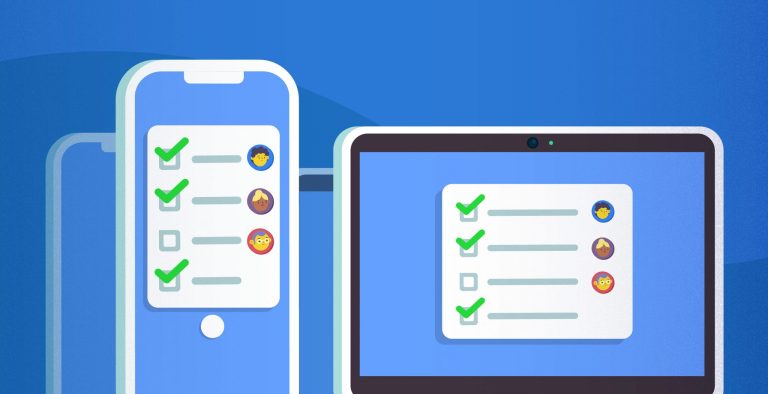
Task Management Tools: Platforms like Trello and Asana can help you stay on top of your workload. These tools allow you to create boards, lists, and project timelines for everything from daily tasks to long-term goals. With deadlines and notifications, important responsibilities are less likely to be forgotten. They also support collaboration by making team communication and progress more transparent.
Dedicating Time: Just as a physical workspace needs regular cleaning, your digital workspace needs routine maintenance. Set aside time each week to organize files, unsubscribe from unnecessary emails, and update task lists. A regular digital cleanup can reduce mental clutter and create a more focused, productive environment.
These practices are not just about personal preference. They create a reliable foundation for sustainable productivity. Digital organization can support many areas of life, from managing personal finance spreadsheets to planning weekly school assignments. As remote work continues to grow in today’s global economy, knowing how to organize your digital environment is a valuable skill that can help you stand out.
DIVE DEEPER: Evaluation of the Best Action Cameras for Technology Beginners
Conclusion: Embrace Digital Organization
The digital world continues to evolve, making organization more important than ever. By applying practical organization strategies, you can simplify your workflow and build a healthier approach to work-life balance.
Take a step back, look at your current digital clutter, and begin improving it one step at a time. With the right habits, you can manage tasks and projects more easily while giving your creativity and productivity room to grow.
Creating a Structured Digital Environment
To build a strong digital workspace, start by creating a structure that feels natural, simple, and easy to navigate. A well-organized environment helps you move through files and applications more quickly while supporting a more focused and efficient workflow.
File Organization Strategies
A strong file organization system is essential. Start with these practical strategies:
Use a Hierarchical Folder Structure: Create a layered folder system. At the highest level, organize files by major projects, responsibilities, or categories. For example, a student might create folders for each class, with subfolders for assignments, notes, and resources. This makes it easier to locate specific files without wasting time.
Consistent Naming Conventions: Use clear and consistent file names. Include useful details such as the date, project name, or status, such as “2023_09_01_Math_Assignment_Final.docx.” This makes files easier to identify at a glance and improves searchability.
Utilize Tags and Labels: Many apps allow you to tag or label files. For example, color-coded labels in Google Drive can help identify priority levels and make important documents easier to spot. Tags and labels add another layer of organization and help reduce digital confusion.
Data shows that an organized file management system can increase productivity by up to 20%. When important documents are easy to access, you spend less time searching and more time completing meaningful work.
Incorporating Effective Task Management
Along with organizing files, effective task management plays a major role in staying productive. These tips can help:
Choose the Right Task Management Tool: Tools such as Microsoft To-Do, Todoist, and ClickUp can help you create, organize, and track tasks efficiently. Choose one that fits your workflow and feels easy to use. Consider features, app integrations, and overall usability before committing to a platform.
Break Down Tasks: When adding tasks, divide larger responsibilities into smaller, more manageable steps. Instead of writing “Research project,” use specific actions such as “Gather sources,” “Write outline,” and “Draft introduction.” This makes big tasks feel less overwhelming and easier to complete.
Set Priorities and Deadlines: Organize tasks by urgency and importance. Setting deadlines creates accountability and encourages a more disciplined approach to completing assignments and projects.
Understanding task management can make your workflow much smoother, especially if you are a beginner dealing with a heavy workload. By using the right tools and techniques, you can build a personalized system that supports the way you work.
As you continue improving your digital workspace, remember that organization is not a one-time task. It is an ongoing process. Regular updates and small adjustments will help your digital environment stay aligned with your changing workflow.
DIVE DEEPER: The Best Affordable Wireless Headphones for Tech Beginners
Essential Tips for Organizing Your Digital Workspace
When it comes to organizing your digital workspace, a few practical techniques can significantly improve productivity. These strategies can help reduce digital clutter, streamline your tasks, and make your workday feel more manageable.
1. Manage Your Files Effectively
A clear folder system is one of the most important parts of digital organization. Start with broad categories, then create more specific subfolders within them. For example, you might use main folders such as Projects, Clients, and Personal, with related subfolders inside each one.
This approach makes files easier to find and adds clarity to your workspace, which can have a noticeable impact on productivity.
2. Utilize Cloud Storage
Cloud storage services such as Google Drive and Dropbox help protect your files while allowing access from multiple devices. This flexibility makes it easier to work from different locations and maintain a smooth workflow wherever you are.
3. Declutter Digital Spaces
Regularly review your digital workspace and delete or archive items you no longer need. A cleaner environment helps reduce distractions and allows you to focus on what matters most.
Consider setting aside time each week to remove unnecessary files, emails, and apps. This keeps only the most useful digital assets within reach.
4. Prioritize Your Tasks
Task management tools such as Trello and Asana can help you organize responsibilities by priority and deadline. Keeping urgent tasks visible brings clarity to your schedule and motivates you to work through your responsibilities in a structured way.
5. Customize Your Digital Tools
Your digital tools should support the way you work. Take time to explore the settings of the applications you use most often. Customize dashboards, notifications, and layouts so they match your working style.
A personalized setup can save time, reduce friction, and make each work session more efficient.
6. Establish a Routine
A clear routine can greatly improve productivity. Try assigning specific times for checking email, completing tasks, and taking breaks. A consistent schedule helps build habits that keep your digital workspace organized and your workflow more efficient.
| Category | Advantage |
|---|---|
| Effective File Management | Helps locate important documents quickly |
| Cloud Storage Accessibility | Allows access to files from anywhere for more flexible work |
| Digital Decluttering | Reduces distractions and improves focus |
By adding these strategies to your daily routine, you can create a digital workspace that is both organized and productivity-friendly. As these habits become part of your workflow, tasks may begin to feel less overwhelming and more achievable.
Leveraging Digital Tools for Enhanced Organization
Once you have created a structured environment and developed effective task management habits, the next step is to use digital tools that can strengthen your organization even further. With so many applications and platforms available, choosing the right tools can improve productivity and make your workflow more efficient.
Cloud Storage Solutions
Cloud storage is essential in today’s digital world. It gives you a convenient place to store, access, and share files while also helping protect against data loss. Here are a few useful options:
Google Drive: This popular platform offers strong collaboration features, allowing users to share and edit documents in real time. With 15GB of free storage, it is a practical option for personal use and smaller projects.
Dropbox: Dropbox is known for its simple interface and reliable file syncing. It also includes automatic backup features, which can help keep important documents safe.
Microsoft OneDrive: For users who already work with Microsoft Office, OneDrive integrates smoothly with existing apps. Its file sharing and collaboration features make it a strong choice for teamwork.
Research indicates that organizations using cloud storage experience a 30% improvement in data accessibility and collaboration. By adopting these tools, you can support a more connected workflow and reduce the sense of isolation that can sometimes come with remote work.
Time Management Applications
Beyond task management, time management is a critical skill for improving your digital workspace. Several applications can help you understand how your time is being used and organize it more effectively.
Toggl: Toggl allows you to track how much time you spend on tasks and projects. Its reporting features help identify productivity patterns, making it easier to plan future schedules more accurately.
Forest: Based on the Pomodoro Technique, Forest encourages focused work sessions by letting you grow a virtual tree while you stay on task. If you leave the app to check social media, the tree dies, helping you resist distractions and maintain focus.
RescueTime: RescueTime runs in the background and automatically tracks how much time you spend on different apps and websites. Its reports can help you identify distractions and make better decisions about how to reduce wasted time.
Studies show that people who manage their time effectively can achieve more than 25% higher productivity. By using time management tools, you can build discipline, improve your work capacity, and maintain better energy throughout the day.
Regular Maintenance and Review
Finally, it is important to create a routine for reviewing and maintaining your digital workspace. Regular maintenance prevents clutter from building up and helps you adjust your organization system when your needs change.
Weekly File Cleanup: Set aside time each week to organize files and delete anything unnecessary. Keeping only essential documents makes your workspace easier to navigate.
Monthly App Review: Review the tools you use regularly. Are they still useful? Are they meeting your current needs? Are there better tools worth trying? Keeping your digital toolkit updated can support ongoing productivity improvements.
Quarterly Goal Setting: Review your progress and set new goals. This habit helps you stay focused, motivated, and aware of what you have accomplished.
By adding these review practices to your routine, your digital workspace can continue to evolve with your needs. Whether you are a student, freelancer, or working professional, maintaining an organized digital environment is essential for reaching your goals.
Conclusion
In today’s fast-moving digital environment, organizing your digital workspace is not only about making things look neat. It is a key part of improving productivity and efficiency. By using a structured approach to task management, adopting cloud storage solutions, and applying time management tools, you can create a workspace that supports your unique workflow.
The tools you choose should match your personal style and professional needs, helping you work more effectively and reach your goals.
Regular maintenance is just as important. Weekly file cleanups, monthly app reviews, and quarterly goal setting help prevent clutter and keep your system aligned with changing demands. These habits build discipline, increase motivation, and create a stronger sense of progress.
Ultimately, building a well-organized digital workspace is an ongoing process. By staying consistent, learning about useful productivity tools, and refining your approach over time, you can work smarter instead of harder. A productive digital environment begins with clarity, accessibility, and intention. Start today, and your future self will thank you.
DIVE DEEPER: The Most Affordable Smart Home Devices to Transform Your Home

Beatriz Johnson is a technology writer with an academic background in Digital Communication and Information Technology. She helps beginners understand digital tools, online safety, apps, productivity, and basic tech skills through clear and practical guides.