Understanding RAM Memory: What Every Beginner Needs to Know
Unlocking the Mysteries of RAM Memory
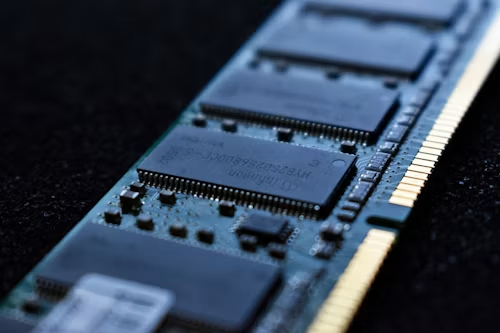
RAM, or Random Access Memory, is one of the most important components in any computer system. It acts as temporary storage for the data your device is actively using or processing. For beginners, RAM memory may seem technical at first, but understanding how it works can make it much easier to choose, upgrade, and use a computer effectively.
Whether you are gaming, working with large spreadsheets, editing videos, or simply browsing the internet, having enough RAM can strongly affect how fast and smoothly your device performs.
Why is RAM Important?
RAM plays a major role in how well your computer handles everyday tasks and demanding applications. Here are the main reasons it matters:
- Performance: Your computer’s performance depends heavily on how much RAM is available. If you use demanding software, such as video editing programs, your system needs more RAM to run smoothly without lag.
- Speed: RAM works like your computer’s short-term memory. The more RAM you have, the faster your device can retrieve and store active data. For example, a gaming PC with 16GB of RAM can load game assets faster than one with only 8GB, creating a smoother experience.
- Multitasking: Modern users often run several applications at once. Adequate RAM allows you to listen to music, work on a document, and keep multiple browser tabs open without slowing the system down.
Demand for high-performance computers continues to grow in the United States, especially among gamers, professionals, and users who rely on resource-heavy applications. This makes understanding RAM memory increasingly important when buying or upgrading a device.
Instead of settling for a basic configuration, it is worth learning how different RAM setups can affect your computer’s performance.
Key Features of RAM
Several features determine how RAM performs and how well it fits your system:
- Type: RAM comes in different types, including DDR4 and the newer DDR5. Each generation offers different levels of speed and efficiency. DDR5, for example, provides higher bandwidth and improved energy efficiency compared with DDR4.
- Capacity: RAM capacity is measured in gigabytes. For light use, 8GB may be enough. However, gamers, content creators, and power users often choose 16GB or more for stronger performance.
- Speed: RAM speed is usually measured in megahertz, or MHz. Faster RAM can process data more quickly, improving response times and overall system efficiency. This can be especially important for gamers looking for a competitive edge.
As you learn more about RAM memory, you can better understand how to improve your device’s speed and efficiency. RAM is no longer a topic reserved only for tech enthusiasts. In today’s digital world, it is useful knowledge for anyone who wants to make smarter technology decisions.
Demystifying RAM: Core Concepts and Functions
For many people, Random Access Memory can sound complicated. In reality, its main purpose is straightforward: RAM gives your computer a temporary workspace where it can quickly access the information needed to complete tasks.
Understanding how RAM works can help you choose the right hardware for your needs, improve performance, and get more satisfaction from your device.
The Role of RAM in Your Computer
When thinking about computer performance, it is important to understand that RAM directly affects speed and responsiveness. When you open a program, its data is loaded into RAM because RAM can be accessed much faster than a storage drive.
This is why having more RAM often leads to a smoother and more efficient computing experience.
Here are the key roles RAM plays:
- Temporary Data Storage: When you work on documents, edit photos, stream videos, or browse the web, RAM temporarily stores the data your system needs to keep those active processes running. Once the computer is turned off, this temporary data is cleared.
- Quick Access: RAM is designed for speed. It allows your computer to access and process information in nanoseconds, much faster than traditional hard drives. This fast access is essential for smooth multitasking.
- Application Performance: Many modern applications require a significant amount of RAM to run properly. A gaming program, for example, may need fast access to high-quality graphics data, making sufficient RAM essential for optimal performance.
LEARN MORE: What is RAM? Beginner’s Guide and Performance
Factors Influencing RAM Effectiveness
Although RAM is essential, its effectiveness depends on several technical factors:
- Density: RAM chips come in different densities and configurations, such as single-channel, dual-channel, or quad-channel. Using multiple channels can improve the speed at which data moves between RAM and the processor.
- Latency: Latency refers to how quickly RAM responds to a request. Lower latency can improve data retrieval and contribute to better system performance.
- Compatibility: Not every RAM module works with every motherboard. Before buying or upgrading RAM, it is important to check compatibility to ensure stable and efficient performance.
As computer tasks become more demanding, understanding RAM features becomes increasingly valuable. Knowing how RAM works, what types are available, and what affects performance can help you make better decisions when purchasing or upgrading technology.
| Category | Description |
|---|---|
| Types of RAM | Different types of RAM, including DRAM and SRAM, serve different performance needs. |
| Speed & Performance | Faster RAM can improve overall system performance, supporting smoother multitasking and better gaming experiences. |
As you explore RAM memory further, understanding the different types becomes essential. Dynamic RAM, or DRAM, is slower but more commonly used in personal computers. It must be refreshed constantly to retain data. Static RAM, or SRAM, is faster and more stable but also more expensive, making it better suited for processor cache memory.
Speed is another important factor. RAM speed is measured in MHz, and higher speeds allow faster data transfer. For gamers and video editors, faster RAM can reduce lag, improve rendering times, and create a more responsive system. Monitoring and upgrading RAM can significantly improve overall performance and lead to a better user experience.
The Different Types of RAM and Their Applications
Learning about RAM memory is not only about understanding what it does. It is also important to know the different types of RAM and where each one is used. Each type has specific strengths that serve different needs, whether you are a casual user, gamer, or professional content creator.
Types of RAM
The two main types of RAM are Dynamic RAM and Static RAM. Each has a different purpose.
- Dynamic RAM (DRAM): DRAM is the most common type of RAM found in personal computers and laptops. It is used as main memory and stores most of the data being actively processed. Because it must be refreshed thousands of times per second to maintain data, it is slower than SRAM. However, its high density and lower cost make it ideal for everyday computing.
- Static RAM (SRAM): SRAM is faster and more expensive than DRAM. It retains data as long as power is supplied and does not need constant refreshing. Because of its speed, SRAM is often used in CPU cache memory. While it is not normally used as a computer’s main memory, it plays an important role in helping systems access frequently used data quickly.
Adding More RAM: The Benefits and Considerations
As software becomes more demanding, you may wonder whether upgrading your RAM is worthwhile. Adding more RAM can offer several benefits:
- Enhanced Multitasking: If you often run several applications at the same time, more RAM can reduce lag and make your system feel smoother.
- Future-Proofing Your System: Additional RAM can help your device handle future software updates and applications that require more memory.
- Improved Gaming Experience: Modern games often require more RAM than older titles. Many recommend 16GB or more for smooth performance, especially when graphics and background processes are demanding.
Common Myths About RAM
Like many computer components, RAM is surrounded by misconceptions. Understanding the facts can help you make better decisions.
- More RAM Means Faster Performance: More RAM can improve performance, but it is not a universal fix. CPU speed, storage type, and software optimization also play major roles in system performance.
- All RAM is the Same: RAM differs by type, speed, latency, and compatibility. Choosing the right RAM for your motherboard and intended use is essential for getting the best results.
Understanding the differences between RAM types, knowing when to upgrade, and recognizing common myths can help you navigate computer memory with more confidence. With this knowledge, you can choose RAM that matches your needs and improves your computing experience.
Conclusion: Your Journey into the World of RAM Memory
Understanding RAM memory is essential for anyone who wants to improve computer performance or build stronger tech knowledge. RAM is not a one-size-fits-all component. It comes in different types, speeds, capacities, and configurations, each suited to different tasks and user needs.
Whether you use DRAM for everyday computing or rely on SRAM in processor cache for faster access speeds, knowing the differences helps you make smarter choices.
It is also useful to recognize when your system may need an upgrade. If you multitask heavily, use demanding software, or want a better gaming experience, adding more RAM may improve performance and prepare your device for future software requirements.
At the same time, it is important to avoid common misconceptions. More RAM does not automatically guarantee faster performance, and not every RAM module will work with every system. Understanding your device’s requirements and how you use it is the best way to choose the right configuration.
As you continue learning about RAM memory, explore further, ask questions, and engage with reliable tech resources. With the right knowledge, you can help your computer perform at its best and make more confident decisions when upgrading or buying new hardware.
LEARN MORE: Demystifying Computers: RAM (Random Access Memory)

Beatriz Johnson is a technology writer with an academic background in Digital Communication and Information Technology. She helps beginners understand digital tools, online safety, apps, productivity, and basic tech skills through clear and practical guides.